Wednesday, May 13, 2015


How To Open Banned Websites WIth Proxy Sites ?
Secrets
10:24 PM
How To Open Banned Websites WIth Proxy Sites ?

There are many sites which are blocked by government because of breaking
laws of their country. The user downloads many softwares to open these
sites but end up being infected by malware, virus. Today i will share a
trick
with you guys which can help you easily open these banned sites without
downloading anything. As you know that there are many online proxies
but everyone need a proxy
server which is faster and trusted. Here in this post I am revealing an
online proxy and a tutorial to open banned sites with the help of these
online proxies which is trusted and fast. Just follow my step to open
banned sites.
How To Open Banned Site ?
1. Open www.incloak.com in your browser.You can also use any proxy site from list below
2. After that enter the URL of the site which you want to open like below.

12 Simple Steps To Become A Hacker
Secrets
10:18 PM
12 Simple Steps To Become A Hacker

Hacking
is an engaging field but it is surely not easy. To become a hacker one
has to have an attitude and curiosity of learning and adapting new
skills. You must have a deep knowledge of computer systems, programming
languages, operating systems and the journey of learning goes on and on.
Some people think that a hacker is always a criminal and do illegal
activities but they are wrong. Actually many big companies hire hackers
to protect their systems and information and are highly paid. We have
prepared a list of 12 most important steps necessary to become a hacker, have a deeper look
1. Learn UNIX/LINUX

UNIX/LINUX is an open source operating system which provides better
security to computer systems. It was first developed by AT&T in Bell
labs and contributed a lot in the world of security. You should install
LINUX freely available open source versions on your desktops as without
learning UNIX/LINUX, it is not possible to become a hacker.
2. Code in C language

C programming is the base of learning UNIX/LINUX as this operating
system is coded in C programming which makes it the most powerful
language as compared to other programming languages. C language was
developed by Dennis Ritchie in late 1970’s. To become a hacker you
should master C language.
3. Learn to code in more than one Programming Language

It is important for a person in the hacking field to learn more than one
programming. There are many programming languages to learn such as
Python, JAVA, C++. Free eBooks, tutorials are easily available online.
4. Learn Networking Concepts

Another important and essential step to become a hacker is to be good at
networking concepts and understanding how the networks are created. You
need to know the differences between different types of networks and
must have a clear understanding of TCP/IP and UDP to exploit
vulnerabilities (loop holes) in system.
Understanding what LAN, WAN, VPN, Firewall is also important.
You must have a clear understanding and use of network tools such as Wireshark, NMAP for packet analyzing, network scanning etc.
5. Learn More Than One Operating Systems

It is essential for a hacker to learn more than one operating system.
There are many other Operating systems apart from Windows, UNIX/LINUX
etc. Every system has a loop hole, hacker needs it to exploit it.
6. Learn Cryptography

To become a successful hacker you need to master the art of
cryptography. Encryption and Decryption are important skills in hacking.
Encryption is widely done in several aspects of information system
security in authentication, confidentiality and integrity of data.
Information on a network is in encrypted form such as passwords. While
hacking a system, these encrypted codes needs to be broken, which is
called decryption.
7. Learn more and more about hacking

Go through various tutorials, eBooks written by experts in the field of
hacking. In the field of hacking, learning is never ending because
security changes every day with new updates in systems.
8. Experiment A Lot

After learning some concepts, sit and practice them. Setup your own lab
for experimental purpose. You need a good computer system to start with
as some tools may require powerful processor, RAM etc. Keep on Testing
and learning until you breach a system.
9. Write Vulnerability (Loop hole program)

Vulnerability is the weakness, loop hole or open door through which you enter the system. Look for vulnerabilities by scanning the system, network etc. Try to write your own and exploit the system.
10. Contribute To Open Source Security Projects

An open source computer security project helps you a lot in polishing
and testing your hacking skills. It’s not a piece of cake to get it
done. Some organizations such as MOZILLA, APACHE offer open source
projects. Contribute and be a part of them even if your contribution is
small, it will add a big value to your field.
11. Continue never ending Learning

Learning is the key to success in the world of hacking. Continuous
learning and practicing will make you the best hacker. Keep yourself
updated about security changes and learn about new ways to exploit
systems
12. Join Discussions and meet hackers

Most important for a hacker is to make a community or join forums,
discussions with other hackers worldwide, so that they can exchange and
share their knowledge and work as a team. Join Facebook groups related
to hacking where you can get more from experts.
How To Reveal The Password Hidden Behind Asterisks
Tricks
10:10 PM

Features:
◦Reveals hidden passwords in dialog boxes and web pages
◦Cutting-edge recovery engine - passwords are instantly recovered
◦Full support for multilingual passwords
◦Easy to use
◦Easy to set up ◦Full install and uninstall support
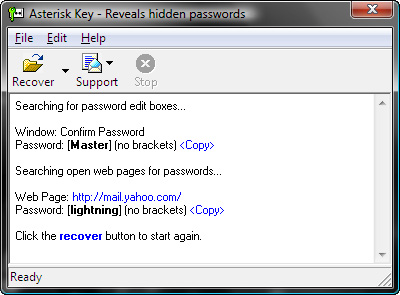
- DOWNLOAD - FULL FREE
Tuesday, May 12, 2015
Make your Computer Welcome You
Computer
10:23 PM
Make your Computer Welcome You
Do you watch movies? Have you always loved the way how Computers in movies welcome their users by calling out their names? I bet that you too would want to know how you can achieve similar results on your PC and have a computer said welcome.Then you are at the right place, this article describes exactly how you can make your computer welcome you like this.
With this trick, you can make your Computer welcome you in its computerized voice. You can make your Windows based computer say "Welcome to your PC, Username."
Make Windows Greet you with a Custom Voice Message at Startup
To use this trick, follow the instructions given below:-
- Click on Start. Navigate to All Programs, Accessories and Notepad.
- Copy and paste the exact code given below.
Dim speaks, speech3. Replace Username with your own name.
speaks="Welcome to your PC, Username"
Set speech=CreateObject("sapi.spvoice")
speech.Speak speaks
4. Click on File Menu, Save As, select All Types in Save as Type option, and save the file as Welcome.vbs or "*.vbs".
5. Copy the saved file.
6. Navigate to C:\Documents and Settings\All Users\Start Menu\Programs\Startup (in Windows XP) and to C:\Users\ {User-Name}\AppData\Roaming\Microsoft\Windows\Start Menu\Programs\Startup (in Windows 8, Windows 7 and Windows Vista) if C: is your System drive. AppData is a hidden folder. So, you will need to select showing hidden folders in Folder options to locate it.
7. Paste the file.

Now when the next time you start your computer, Windows will welcome you in its own computerized voice.
Note: For best results, it is recommended to change sound scheme to No Sounds.
You can change the sound scheme to No Sounds by following the steps given below:-
- Go to Control Panel.
- Then click on Switch to Classic View.
- Then Click on Sounds and Audio Devices.
- Then Click on the Sounds Tab.
- Select No Sounds from the Sound Scheme option.
- If you wish to save your Previous Sound Scheme, you can save it by clicking Yes in the popup menu.
- Click on OK.

Try it yourself to see how it works. In my personal opinion, this is an excellent trick. Whenever I start my PC in front of anybody and the PC welcomes me, the fellow is left wondering how brilliant a computer do I have.
How hackers hack Facebook Account & How to stop them?
hack
10:19 PM
How hackers hack Facebook Account & How to stop them?
Facebook is, undoubtedly, the most popular social networking website with more than 500 million active users. Due to its popularity, many hackers (or should I say crackers?) are actively involved in hacking Facebook accounts of unsuspecting users. This article outlines the many strategies that such hackers use to gain access to Facebook accounts of hundreds of users each day and how you can stop them from hacking your account. |
| Facebook is one of the prime target of hackers! |
Email Address Hack
I have always been puzzled by Facebook's leniency in this matter. All a hacker needs to do is know your email address and he will be displayed a confirmation showing your name even if he enters the wrong password. How easily a hacker can then hack your Facebook account if he 'guesses' your password (if you use a weak password) or answers your security question! This is something I hope Facebook improves on quickly. Until Facebook does so, here are some tricks you can use to protect yourself from this vulnerability.How to safeguard your Email Address?
Just follow these steps:-
- Hide your Email Address from everyone by going to Edit Profile>Contact Information>Clicking on the icon beside your email address> checking 'Only Me'.
- Change your primary email address to a one that is only known to you by going to Account Settings>Email> and changing your primary email to the new one (known only to you) and removing your previous email address.
- For additional security, when in Account Settings, check 'Secure browsing' and 'Send me an email when a new computer or mobile device logs into this account' and click Save.
 |
| A hacker at work! |
Phishing
Phishing is one of the easiest ways to trick users into giving out their login credentials. All a hacker does is setup a webpage similar in design to that of the Facebook homepage, attach a server sided script to track the username and password entered and store it in a log. Sending people emails stating that someone tagged a photo of them on Facebook in the same format as Facebook and giving a link below to the phishing website further reduces the chances of it being detected as a fake. Sometimes, spam Facebook apps, like those promising to tell who viewed your Facebook profile, automatically post links to phishing websites. A new trend amongst phishers is creating Facebook look-a-like widgets for stealing user's login credentials.How to prevent yourself from being phished?
At all costs, avoid clicking on suspicious links. Moreover, always check the URL in the address bar before signing in. Avoid logging in through various "Facebook widgets" offered by websites and blogs. Instead, use Facebook's homepage to sign in. Always try to use Safe Search while searching. If you do manage to get phished, report the website so that others may get a warning before visiting it.

Keylogging through Keyloggers
Keylogger is a type of computer virus that tracks key strokes. Keyloggers can be installed remotely on a computer system by a cracker to record all the activity that is going on the victim's computer. Keylogging gets more easy if the hacker has physical access to the victim's computer.How to stop keyloggers?
Install a good antivirus and update it frequently. Do not click on suspicious links and avoid downloading illegal software. Also, avoid installing free toolbars and other such spam software. Always scan third-person's flash and pen drives before using them on your computer.
Social Engineering
Social engineering involves using any trick to fool the user into making himself vulnerable to exploits. This could involve anything from sending spoof emails, pretending to be from Facebook, telling you to change your password to 12345678 to a hacker maliciously getting out the answer to your Security Question in a friendly chat or discussion.How to prevent yourself from being socially engineered?
Stay aware during chats and discussions. Use a tough security question, preferably one whose answer you would never disclose to anyone. Moreover, Facebook, or any other company for that matter, will never ask you to change your password to 12345678 or do something as silly as asking you to send out your login details to prove that you are an active user. Always think before taking actions and your e-life on Facebook will be safe from hackers looking to hack Facebook accounts.
Google Tricks & Secrets
Tricks
9:33 PM
Google's engineers
love to hide some pretty cool tricks at the most unexpected places. Add
to that Google's policy of giving 20% of working time to its engineers
to do what they want, and you have a search engine filled with lots of
entertaining Easter eggs and tricks.
Sadly, most of these tricks are still a secret, but every now and then, Google employees leak these cool insider pranks and the whole world gets to know about them. Here, I have created a list of all such known Google tricks and Easter eggs that are still "working."

Google in 1998
Search Google for "Google in 1998" and you will be taken to the past to a search results page that shows how Google looked in 1998.
Kerning
Kerning means adjusting the spacing between characters. So, how would you expect Google to describe it? Literally, off course. When you search Google for Kerning, the spacing of the word Kerning is changed as compared to that of other words. This only works with personalized results disabled.
Conway's Game Of Life
Conway's Game Of Life is a game that indicates how cellular life evolves based on the initial configuration. If you search Google for Conway's Game of Life, you will get a results page with the game running in the background.
Jason Isaacs
Just search for Jason Isaacs and Google will return a page saying Hello to him. This only works on Google UK. This is a reference to Kermode and Mayo's Film reviews which greets Jason with hello every week.
Bacon Number {Actor Name}
Kevin Bacon is a famous hollywood actor who was quoted as saying that he has worked with everybody in hollywood or somebody who has worked with them in 1994. This led to many websites being launched about his claim in 2007. Bacon seeing this immense response launched a charitable website called Six Degrees, which is based on a theory that everyone in hollywood has worked with Kevin Bacon through a chain of six acquaintances or less. An actor gets as many degrees as he is distant from Kevin Bacon's movies in terms of people in the chain of acquaintances.
Google too has now involved Six Degrees of Bacon in its search results. For example, searching Google for Bacon Number Johnny Depp gives Depp's Bacon number to be 2.
Google knows how to celebrate the holidays
Searching Google for a holiday will make Google return a page decorated with items representing that holiday. For example, searching Google for Christmas returns a page decorated with Christmas lights. This also works for Kwanzaa, Hanukkah, Halloween and Festivus. These Easter Eggs based on a festival are only activated when that festival is near.
Zerg Rush
Search Google for Zerg Rush and you will see the O's of Google attacking the search results page. They will attacking every result one by one. There is a health bar which indicates how injured a search result is. You can also kill these O's by clicking on them. They also have health bars which indicates their health. You get points on the basis of how many O's you kill. The aim of this game is to beat as many O's as possible.

Askew or Tilt
Ever had the chance of searching Google for Askew or Tilt? If you have, then you already know what comes up. If you haven't, do it now and you will see the search results page literally tilt to give you a better idea of what these words mean. This will work only if you use latest browsers which support HTML5 and CSS3. So, Internet Explorer users, use Firefox, Google Chrome or Safari for a while to use this.
Do a barrel roll
 'Do
a barrel roll' in its true sense means to do a 360 degree spin. Google
takes practical demonstrations way too seriously for this one and
literally spins the search results page to give you a clearer idea of
the meaning of this phrase. Don't believe me? Go search Google for Do a barrel roll now and see your world turn around.
This Easter egg is apparently a tribute to Star Fox, a video game series developed by Nintendo, because searching Google for Z or R Twice also does the barrel roll, just like in Star Fox. Many bloggers interpreted a lot of different things from this, but Google clarified that this fun trick was created by a Google Engineer solely for the purpose of entertaining users along with showing the power of new HTML5 and CSS3 technologies. Like the previous Easter egg, this will only work in modern browsers.
Binary, Octal and Hexadecimal Number systems
Another one of those literal Google Easter eggs. If you search Google for "Binary", "Octal" or "Hexadecimal" (without quotes) with Search Plus Your World disabled, Google will show the number of results in the same number system. For example, searching Google for hexadecimal will return the number of results like in the image below.

Recursion
The "Did you mean?" feature of Google often helps many users to get to the right results when they type something different from what they intended to search. If you search Google for recursion, the same feature takes you to an endless loop of clicks all linking to the same results page thereby completing recursion, which occurs when something calls itself. Seriously geeky.

Anagram
Another one of those "Did you mean?" Easter eggs. Search Google for Anagram and Google will instantly ask whether you meant "Nag A Ram" which is one of the anagrams of the word "anagram." Google really shows their word-playing skills with this one.
Asking Google to define Anagram makes Google ask if you meant nerd fame again.
ASCII Art
Are you a fan of ASCII art? Google surely is. Search Google for ASCII art and Google will greet you with a search results page having an ASCII version of the Google logo at the place where normal logo should have been. This Easter egg does not work anymore. When it did work, it looked like the image given below.

Google Calculator Easter Eggs: The loneliest number
 Do
you know which is the loneliest number? Ask Google Calculator. Search
Google for the loneliest number and the in-search Google Calculator will
give one as the answer, which apparently is a tribute to the Harry
Nilsson's song "One."
Once in a Blue Moon
 Ever
wondered how much is 'once in a blue moon'? You must have heard this
phrase often but Google calculator will give you the exact value of this
phrase and surprisingly, it denotes frequency rather than time. Go
search Google for this to get "1.16699016 × 10⁻⁸ hertz" as the answer.
The number of horns on a unicorn
Want to know the number of horns on a unicorn? Google calculator can help. Searching Google for the number of horns on a unicorn will give 1 as the answer.
Answer to the Ultimate Question of Life, the universe and everything
 Google
is omniscient. Even the "answer to the ultimate question of life, the
universe and everything" is known to Google. Just search Google for the
above phrase and Google calculator will give you an answer. What are you
waiting for? Just go to Google and find the true meaning of life.
[Pause to give you the time to search]
Surprised by the answer (42)? This is a reference to The Hitchhiker's Guide to the Galaxy, a popular novel based on a radio show (by the same name) of the late seventies. Google engineers surprised you with these tricks, didn't they?
Recommended: Google : I'm feeling lucky tricks and jokes.
Sadly, most of these tricks are still a secret, but every now and then, Google employees leak these cool insider pranks and the whole world gets to know about them. Here, I have created a list of all such known Google tricks and Easter eggs that are still "working."
Google in 1998
Search Google for "Google in 1998" and you will be taken to the past to a search results page that shows how Google looked in 1998.
Kerning
Kerning means adjusting the spacing between characters. So, how would you expect Google to describe it? Literally, off course. When you search Google for Kerning, the spacing of the word Kerning is changed as compared to that of other words. This only works with personalized results disabled.
Conway's Game Of Life
Conway's Game Of Life is a game that indicates how cellular life evolves based on the initial configuration. If you search Google for Conway's Game of Life, you will get a results page with the game running in the background.
Jason Isaacs
Just search for Jason Isaacs and Google will return a page saying Hello to him. This only works on Google UK. This is a reference to Kermode and Mayo's Film reviews which greets Jason with hello every week.
Bacon Number {Actor Name}
Kevin Bacon is a famous hollywood actor who was quoted as saying that he has worked with everybody in hollywood or somebody who has worked with them in 1994. This led to many websites being launched about his claim in 2007. Bacon seeing this immense response launched a charitable website called Six Degrees, which is based on a theory that everyone in hollywood has worked with Kevin Bacon through a chain of six acquaintances or less. An actor gets as many degrees as he is distant from Kevin Bacon's movies in terms of people in the chain of acquaintances.
Google too has now involved Six Degrees of Bacon in its search results. For example, searching Google for Bacon Number Johnny Depp gives Depp's Bacon number to be 2.
Google knows how to celebrate the holidays
Searching Google for a holiday will make Google return a page decorated with items representing that holiday. For example, searching Google for Christmas returns a page decorated with Christmas lights. This also works for Kwanzaa, Hanukkah, Halloween and Festivus. These Easter Eggs based on a festival are only activated when that festival is near.
Zerg Rush
Search Google for Zerg Rush and you will see the O's of Google attacking the search results page. They will attacking every result one by one. There is a health bar which indicates how injured a search result is. You can also kill these O's by clicking on them. They also have health bars which indicates their health. You get points on the basis of how many O's you kill. The aim of this game is to beat as many O's as possible.
Askew or Tilt
Ever had the chance of searching Google for Askew or Tilt? If you have, then you already know what comes up. If you haven't, do it now and you will see the search results page literally tilt to give you a better idea of what these words mean. This will work only if you use latest browsers which support HTML5 and CSS3. So, Internet Explorer users, use Firefox, Google Chrome or Safari for a while to use this.
Do a barrel roll
This Easter egg is apparently a tribute to Star Fox, a video game series developed by Nintendo, because searching Google for Z or R Twice also does the barrel roll, just like in Star Fox. Many bloggers interpreted a lot of different things from this, but Google clarified that this fun trick was created by a Google Engineer solely for the purpose of entertaining users along with showing the power of new HTML5 and CSS3 technologies. Like the previous Easter egg, this will only work in modern browsers.
Binary, Octal and Hexadecimal Number systems
Another one of those literal Google Easter eggs. If you search Google for "Binary", "Octal" or "Hexadecimal" (without quotes) with Search Plus Your World disabled, Google will show the number of results in the same number system. For example, searching Google for hexadecimal will return the number of results like in the image below.
Recursion
The "Did you mean?" feature of Google often helps many users to get to the right results when they type something different from what they intended to search. If you search Google for recursion, the same feature takes you to an endless loop of clicks all linking to the same results page thereby completing recursion, which occurs when something calls itself. Seriously geeky.
Anagram
Another one of those "Did you mean?" Easter eggs. Search Google for Anagram and Google will instantly ask whether you meant "Nag A Ram" which is one of the anagrams of the word "anagram." Google really shows their word-playing skills with this one.
Asking Google to define Anagram makes Google ask if you meant nerd fame again.
ASCII Art
Are you a fan of ASCII art? Google surely is. Search Google for ASCII art and Google will greet you with a search results page having an ASCII version of the Google logo at the place where normal logo should have been. This Easter egg does not work anymore. When it did work, it looked like the image given below.
Google Calculator Easter Eggs: The loneliest number
Once in a Blue Moon
The number of horns on a unicorn
Want to know the number of horns on a unicorn? Google calculator can help. Searching Google for the number of horns on a unicorn will give 1 as the answer.
Answer to the Ultimate Question of Life, the universe and everything
[Pause to give you the time to search]
Surprised by the answer (42)? This is a reference to The Hitchhiker's Guide to the Galaxy, a popular novel based on a radio show (by the same name) of the late seventies. Google engineers surprised you with these tricks, didn't they?
Recommended: Google : I'm feeling lucky tricks and jokes.
Subscribe to:
Posts (Atom)